
Quick Text Clear for Web Forms
Overview
The software is designed to streamline text clearance in web-based input fields, specifically targeting HTML input and textarea elements within browsers. It functions as a lightweight utility that activates automatically when a user focuses on a field containing text, offering a convenient way to clear content without manual selection. This tool is particularly useful for users who frequently interact with online forms, such as filling out surveys, logging into accounts, or submitting data across multiple web platforms. By eliminating the need to highlight and delete text manually, it reduces repetitive strain and speeds up workflow efficiency.
The target audience includes professionals and general users who rely on web forms for daily tasks, such as customer support agents, data entry clerks, and remote workers. While the developer has not provided additional background information, the software’s minimal footprint and focused functionality suggest a design philosophy centered on simplicity and performance. Real-world usage scenarios include clearing login credentials, resetting search queries, or preparing forms for new input without navigating away from the page.
Key Features & Capabilities
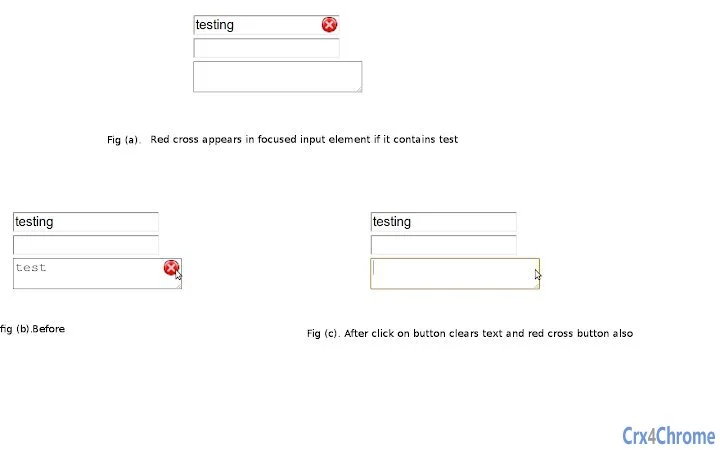
- Automatic Button Display: A red cross icon appears dynamically within the focused input field when text is present, providing immediate visual feedback and a clear action point.
- One-Click Clearing: Clicking the red cross instantly removes all text from the current field, eliminating the need for keyboard shortcuts or manual highlighting.
- Context-Aware Operation: The tool only activates on input fields that contain text, avoiding unnecessary interface clutter in empty fields.
- Seamless Browser Integration: Designed to work directly within the browser environment without requiring additional setup or external dependencies.
- Minimal User Interaction: The interface remains unobtrusive, ensuring that the user’s focus stays on the form rather than the tool itself.
These features are especially beneficial in high-frequency form usage environments. For example, a customer service representative managing multiple support tickets may benefit from rapid clearing of contact details between cases. Similarly, researchers conducting repeated web searches can quickly reset query fields without distraction.
User Interface, Workflow & Performance
The user interface is minimal and context-driven, relying on a single visual cue—the red cross icon—appearing directly within the input field. This design ensures that the tool does not disrupt the standard form layout or interfere with existing UI elements. Navigation is intuitive: users simply focus on a text field, and if content is present, the clear button becomes visible. Clicking it clears the field immediately.
Workflow efficiency is enhanced by the tool’s automatic detection and response mechanism. Users do not need to configure settings or enable features manually. The software operates in the background, responding instantly to focus events. Performance observations are based on general software behavior patterns; the tool is designed to be lightweight and responsive. The developer did not specify resource usage details, but its 2.1 MB size suggests a compact footprint with minimal impact on system performance.
Stability is expected to be consistent with its focused scope. As a browser-based utility with no external dependencies, it is less prone to crashes or conflicts. However, exact stability metrics were not provided.
Compatibility & System Requirements
The software is compatible with Windows, Mac, and Linux operating systems, making it accessible across major desktop platforms. It operates within modern web browsers, leveraging standard HTML and JavaScript APIs to interact with form elements. The installation size is 2.1 MB, which is typical for lightweight browser extensions or utilities.
Exact system requirements were not listed. Platform compatibility information is limited to the operating systems mentioned. Hardware requirements are not specified, but the tool’s design implies minimal demands on CPU or RAM. It is intended for use in standard desktop environments without specialized configurations.
Pros and Cons
Pros
- Effortless text clearing with a single click
- Intuitive, context-sensitive interface
- Minimal visual disruption in web forms
- Works across Windows, Mac, and Linux
- Completely free to use
Cons
- Functionality limited to web-based input fields
- No customization options for the clear button
- Does not support form-wide clearing
- Dependent on browser compatibility
- No offline mode or standalone version
FAQ Section
Is this tool compatible with all web browsers?
The software is designed to work with modern browsers, but specific browser compatibility details were not provided by the developer.
Is the software secure to use?
As a lightweight utility that operates within the browser context and does not transmit data, it is considered secure for standard use. However, no formal security audits were mentioned.
How often does the tool receive updates?
Update frequency is not specified. The current version is 1.0.0, released on April 15, 2024.
What type of license does this software use?
The software is distributed as free to use, with no restrictions mentioned beyond its intended functionality.
Can I use this tool without an internet connection?
The tool requires a live browser environment to function and cannot operate in fully offline scenarios.
Final Thoughts
Quick Text Clear for Web Forms delivers a focused, efficient solution for a common digital friction point: clearing text in web forms. Its automatic, non-intrusive design makes it ideal for users who interact with online forms regularly. While it lacks advanced customization, its simplicity is its greatest strength. For professionals and everyday users seeking a reliable way to reset input fields quickly, this tool offers tangible productivity gains without complexity.
Download Quick Text Clear for Web Forms now.







